Sunday, November 16, 2008
The Evolution
Man is a selfish creature,
Always He dwells into self,
Whatever may come by,
If the ship is Drowning,
He will search for a raft.
Selfishness is not bad,
Man is the God’s creation,
He would have to survive the massacre,
Isn’t that the theory of Evolution?
Rarely, the things occur differently,
Survival instinct gets overshadowed,
The mind is playing with emotion,
And He may overcome the EVOLUTION.
‐KS(2006) Click Here to Read More..


Thursday, October 30, 2008
The Beeping Time Bomb - A short story
John is a software engineer working in Soft Tech Ltd which is a pioneer in development of Robotic softwares.
But John, though a diligent employee, was currently not completely dedicated to his company. Rather he was working on software that could revolutionize the living of entire world. He was working hard and each day his work was progressing as he had wished. But today was different.
Today, it was really different for John. He didn’t know what was coming. The rains of Mumbai took him soaked into his office of Soft Tech Ltd. He was late. He endured the scorn look of his boss. He thought, “Such a bad day to start.” He greeted his boss and got on with the work but his mind was on his project.
Absentmindedly, he completed his office work and left for home around 6:30 PM.
He took the bus and tolerated all the scuffles in the crowded bus. At last, he reached his destination. He stepped down the bus which barely stopped to let him off. Suddenly, he palpated his trousers back pocket, someone had pick pocketed him. He thought, “Another bad event of the day. What more worse can happen.”
But worst was still to come, waiting for him at home.
He consoled himself that there was not much money in the purse. He moved on.
When he reached home, it was very dark, a very dark night. He opened the door of his room. He wanted some fresh air but in this polluted world, it was not to be. He went on and opened the windows. As he just opened, what he hears! A long continuous time bomb beep with every second.
He was terrified. Fearful thoughts of losing everything flashed his mind. What’s that? Who could have done it? What would happen now? He fearfully closed, the windows and stepped back. He looked on. He was terrified but he could not leave it then and there.
He took a deep breath and tread forward and again opened the windows. The time bomb beep was blaring again. This made john wholly devastated. He closed it and prayed to God. Is this going to be the worst end of this day?
Prayers gave him some strength. He tread forward and reopened windows. Voila! This time the windows came alive and his valuable data was there sitting on its desktop. His career, his life had saved. Click Here to Read More..
But John, though a diligent employee, was currently not completely dedicated to his company. Rather he was working on software that could revolutionize the living of entire world. He was working hard and each day his work was progressing as he had wished. But today was different.
Today, it was really different for John. He didn’t know what was coming. The rains of Mumbai took him soaked into his office of Soft Tech Ltd. He was late. He endured the scorn look of his boss. He thought, “Such a bad day to start.” He greeted his boss and got on with the work but his mind was on his project.
Absentmindedly, he completed his office work and left for home around 6:30 PM.
He took the bus and tolerated all the scuffles in the crowded bus. At last, he reached his destination. He stepped down the bus which barely stopped to let him off. Suddenly, he palpated his trousers back pocket, someone had pick pocketed him. He thought, “Another bad event of the day. What more worse can happen.”
But worst was still to come, waiting for him at home.
He consoled himself that there was not much money in the purse. He moved on.
When he reached home, it was very dark, a very dark night. He opened the door of his room. He wanted some fresh air but in this polluted world, it was not to be. He went on and opened the windows. As he just opened, what he hears! A long continuous time bomb beep with every second.
He was terrified. Fearful thoughts of losing everything flashed his mind. What’s that? Who could have done it? What would happen now? He fearfully closed, the windows and stepped back. He looked on. He was terrified but he could not leave it then and there.
He took a deep breath and tread forward and again opened the windows. The time bomb beep was blaring again. This made john wholly devastated. He closed it and prayed to God. Is this going to be the worst end of this day?
Prayers gave him some strength. He tread forward and reopened windows. Voila! This time the windows came alive and his valuable data was there sitting on its desktop. His career, his life had saved. Click Here to Read More..
Wednesday, October 08, 2008
My first Vista gadget
Hi,
This is a post by me after a long time. But, it should be useful to you.
This vista gadget is a simple gadget which will provide you with one click access to certain websites. It will sit in your sidebar and just click it once to visit one of your favourite sites.
Try this gadget and comment on it. I am waiting to hear.
click to Download this gadget Click Here to Read More..
This is a post by me after a long time. But, it should be useful to you.
This vista gadget is a simple gadget which will provide you with one click access to certain websites. It will sit in your sidebar and just click it once to visit one of your favourite sites.
Try this gadget and comment on it. I am waiting to hear.
click to Download this gadget Click Here to Read More..
Thursday, July 31, 2008
Double bow
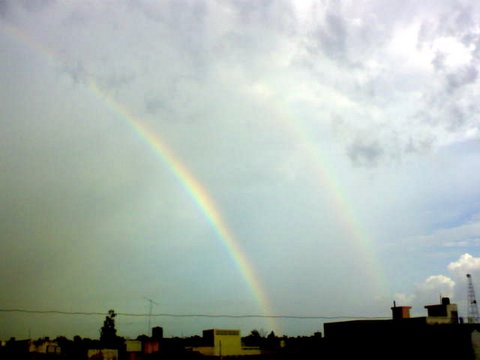 What's so unique about this photograph?
 I think it's the double rainbow. i had never seen such a view in the past until my brother , Mohit, took this unique photograph. Has anyone of you seen such a happening? Whatever you want to say do comment....

Sunday, October 15, 2006


Thursday, April 20, 2006
TIPS TO CUSTOMIZE YOUR PC (PRIMARILY FOR WINXP)
TIPS TO CUSTOMIZE YOUR PC(Primarily for winxp)
- Press Win+L to switch to the Welcome screen
- Press Win+L to lock your workstation.
- You can switch users without going through the Welcome screen: From Task Manager, go to the Users tab, right-click a user, and select Connect.
- Hold down the shift key in the shutdown dialog to change "Stand By" to "Hibernate". Or just press H to hibernate instantly. You can even use the Power Control Panel to configure your power button to hibernate.
- To disable the password when resuming from standby or hibernation, open the Power Control Panel and uncheck "Prompt for password after returning from standby" on the Advanced tab.
- You can rename multiple files all at once: Select a group of files, right-click the first file, and select "Rename". Type in a name for the first file, and the rest will follow.
- Hold down the shift key when switching to thumbnail view to hide the file names. Do it again to bring them back.
- When dragging a file in Explorer, you can control the operation that will be performed when you release the mouse button:Hold the Control key to force a Copy.Hold the Shift key to force a Move.Hold the Alt key to force a Create Shortcut.
- If you create a file called Folder.jpg, that image will be used as the thumbnail for the folder. What's more, that image will also be used as the album art in Windows Media Player for all media files in that folder.
- From the View Menu, select "Choose Details" to select which file properties should be shown in the Explorer window. To sort by a file property, check its name in the "Choose Details" in order to make that property available in the "Arrange Icons by" menu.
- To display the volume control icon in the taskbar, go to the Sounds and Audio Devices Control Panel and select "Place volume icon in the taskbar".
- Hold down the shift key when deleting a file to delete it immediately instead of placing it in the Recycle Bin. Files deleted in this way cannot be restored.
- f you hold down the shift key while clicking "No" in a Confirm File Operation dialog, the response will be interpreted as "No to All".
- To save a document with an extension other than the one a program wants to use, enclose the entire name in quotation marks. For example, if you run Notepad and save a file under the nameDr.Zit will actually be saved under the name Dr.Z.txt. But if you type"Dr.Z"then the document will be saved under the name Dr.Z. Note that a document so-named cannot be opened via double-clicking since the extension is no longer ".txt".
- Put a shortcut to your favorite editor in your Send To folder and it will appear in your "Send To" menu. You can then right-click any file and send it to your editor.
- Ctrl+Shift+Escape will launch Task Manager.
- To arrange two windows side-by-side, switch to the first window, then hold the Control key while right-clicking the taskbar button of the second window. Select "Tile Vertically".
- To close several windows at once, hold down the Control key while clicking on the taskbar buttons of each window. Once you have selected all the windows you want to close, right-click the last button you selected and pick "Close Group".
- You can turn a folder into a desktop toolbar by dragging the icon of the desired folder to the edge of the screen. You can then turn it into a floating toolbar by dragging it from the edge of the screen into the middle of the screen. (It helps if you minimize all application windows first.
- You can turn a folder into a taskbar toolbar.First, unlock your taskbar.Next, drag the icon of the desired folder to the space between the taskbar buttons and the clock. (Wait for the no-entry cursor to change to an arrow. It's a very tiny space; you will have to hunt for it.)You can rearrange and resize the taskbar toolbar you just created.You can even turn the taskbar toolbar into a menu by resizing it until only its name is visible.
- In the Address Bar, type "microsoft" and hit Ctrl+Enter. Internet Explorer automatically inserts the "http://www." and ".com" for you.
- To remove an AutoComplete entry from a Web form, highlight the item in the AutoComplete dropdown and press the Delete key.To remove all Web form AutoComplete entries, go to the Internet Explorer Tools menu, select Internet Options, Content, AutoComplete, then press the "Clear Forms" button.
- To organize your Favorites in Explorer instead of using the Organize Favorites dialog, hold the shift key while selecting "Organize Favorites" from the Favorites menu of an Explorer window.
- You can organize your Favorites by dragging the items around your Favorites menu.Alternatively, you can open the Favorites pane and hold the Alt key while pressing the up and down arrows to change the order of your Favorites.-----
- To run Internet Explorer fullscreen, press F11. Do it again to return to normal mode.
- If your "Printers and Faxes" folder is empty, you can hide the "Printers and Faxes" icon when viewed from other computers by stopping the Print Spooler service.
- To add or remove columns from Details mode, select Choose Details from the View menu, or just right-click the column header bar.
- In Internet Explorer, hold the Shift key while turning the mouse wheel to go forwards or backwards.
- In Internet Explorer, hold the Shift key while clicking on a link to open the Web page in a new window.
- In Internet Explorer, type Ctrl+D to add the current page to your Favorites.This and many more keyboard shortcuts can be found by going to Internet Explorer, clicking the Help menu, then selecting Contents and Index. From the table of contents, open Accessibility and click "Using Internet Explorer keyboard shortcuts.
- In some applications (such as Internet Explorer), holding the Control key while turning the mouse wheel will change the font size.
- To shut down via Remote Desktop, click the Start button, then type Alt+F4.
Thursday, August 18, 2005
Welcome to this site.
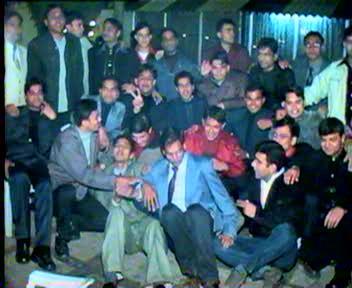 This photograph is of a farewell party organised by 1999 batch of LLRM Medical College, Meerut at timbuktoo restaurant garh road, Meerut. This blog is dedicated to the students of 1999 batch. All 99 batch students are requested to post there memoirs here.
Click Here to Read More..
This photograph is of a farewell party organised by 1999 batch of LLRM Medical College, Meerut at timbuktoo restaurant garh road, Meerut. This blog is dedicated to the students of 1999 batch. All 99 batch students are requested to post there memoirs here.
Click Here to Read More..
Subscribe to:
Posts (Atom)